
In Pakistan, a fast and stable internet connection is no longer a luxury — it’s a necessity. Whether you’re attending online classes, working remotely, or streaming Netflix, weak WiFi signals can be incredibly frustrating. Many Pakistani homes, especially those with thick walls or multiple floors, experience “dead zones” where the internet simply disappears.
That’s where a WiFi range extender comes in. It amplifies your router’s signal, eliminating weak spots and ensuring fast, consistent internet throughout your home. In this guide, we’ll explore why every Pakistani household should consider investing in one.
What Is a WiFi Range Extender?
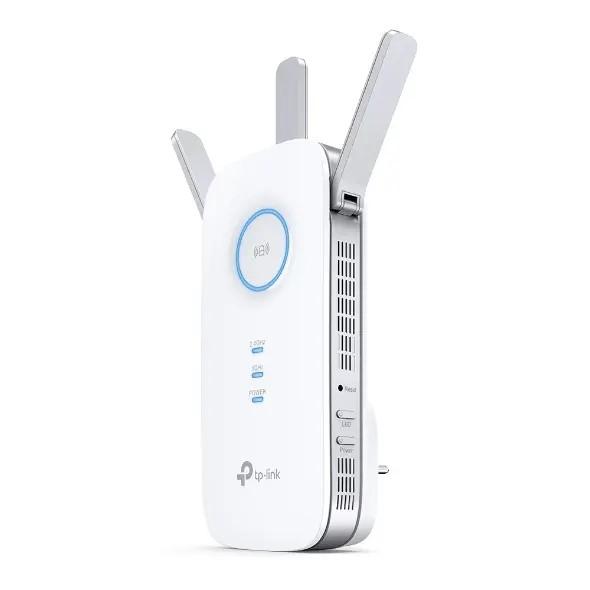
A WiFi range extender, sometimes called a repeater or booster, is a simple yet powerful device that extends your existing WiFi network’s coverage. It connects to your router’s signal and rebroadcasts it, filling in areas where your WiFi signal is weak or absent.
Understanding How It Works
Think of it as a bridge between your router and your devices. It receives the wireless signal from your router, amplifies it, and transmits it further. This helps deliver strong WiFi even in areas that were previously unreachable.
Difference Between WiFi Extenders, Boosters, and Mesh Systems
WiFi Extender: Repeats the signal from your existing router.
WiFi Booster: A general term for devices that strengthen WiFi performance.
Mesh System: Uses multiple access points for seamless whole-home coverage.
For most Pakistani homes, a WiFi range extender offers the best balance between price and performance.
Common WiFi Problems Faced by Pakistani Users
Thick Walls and Signal Interference
Homes in Pakistan are often built with thick concrete walls, which can block WiFi signals. Extenders help the signal penetrate these walls, ensuring consistent coverage.
Multi-Story Homes and Large Spaces
If your WiFi router is on the ground floor, it might not reach the upper floors effectively. A range extender helps bridge that gap, ensuring you get a stable signal everywhere.
Internet Speed Drops and Dead Zones
Unreliable internet speed is one of the biggest frustrations for Pakistani users. Range extenders can help eliminate these dead zones, making your connection smooth and fast.
Benefits of Using a WiFi Range Extender
Wider Coverage and Stronger Signal Strength
A WiFi extender can double or even triple your coverage area, ensuring every corner of your home stays connected.
Seamless Streaming and Gaming Experience
Lagging video calls and buffering streams are a thing of the past. With an extender, you can enjoy HD streaming and gaming without interruption.
Cost-Effective Internet Upgrade
Instead of paying for a more expensive internet plan, investing in a WiFi range extender offers a one-time, affordable solution.
Easy Setup and Compatibility
Most extenders are plug-and-play and compatible with all major routers, making setup simple even for beginners.
Top Features to Look for in a WiFi Range Extender
Dual-Band Connectivity (2.4GHz & 5GHz)
Dual-band extenders offer better performance by balancing the load between two frequency bands.
Speed Standards: AC, AX, and Beyond
For high-speed connections, choose extenders with WiFi 5 (AC) or WiFi 6 (AX) technology.
Ethernet Port and Smart Indicator Lights
Ethernet ports allow direct device connections, and smart lights help find the best placement spot.
How to Install and Optimize Your WiFi Range Extender
- Step-by-Step Installation Guide
- Plug in the extender near your router.
- Connect to the setup network (usually named after the extender).
- Access the configuration page and connect it to your main WiFi network.
- Move it to an area with moderate signal strength.
Placement Tips for Maximum Coverage
Avoid placing it near microwaves or cordless phones.
Place it midway between your router and the dead zone.
Keep it elevated, such as on a shelf.
Common Mistakes to Avoid
Placing too far from the router.
Using an outdated extender.
Forgetting to update firmware.
Best WiFi Range Extenders Available in Pakistan (2025 Update)
TP-Link, Tenda, and D-Link Models
TP-Link RE450: Excellent for large homes.
Tenda A301: Budget-friendly option for small apartments.
D-Link DAP-1610: Great balance between price and performance
Price Range and Availability on Purchaser.com
You can find these models easily on Purchaser.com, with prices ranging between PKR 6,000 to PKR 18,000, depending on the model and features.
WiFi Range Extender vs. Upgrading Internet Plan: Which Is Better?
Cost Comparison
A higher internet plan might improve speed but won’t fix weak signals. A range extender, however, solves coverage issues at a much lower cost.
Long-Term Performance
Extenders offer a lasting solution for households struggling with coverage — no recurring costs, just better WiFi everywhere.
Expert Tips to Boost Your Home WiFi Signal
Keep your router in a central location.
Update your router’s firmware regularly.
Use wired Ethernet for smart TVs or consoles
Disconnect unused devices to free up bandwidth.
FAQs About WiFi Range Extenders
1. Can I use a WiFi extender with any router?
Yes, most modern extenders work with all standard WiFi routers.
2. Will an extender increase my internet speed?
It won’t increase your plan’s speed but ensures you get full available speed throughout your home.
3. How many extenders do I need?
One extender is enough for medium-sized homes; larger homes may need two.
4. Can I use multiple extenders together?
Yes, but they must be placed strategically to avoid overlapping signals.
5. What’s the difference between 2.4GHz and 5GHz?
2.4GHz covers longer distances, while 5GHz offers faster speeds at shorter ranges.
6. Is it worth buying from Purchaser.com?
Absolutely! Purchaser.com offers genuine products, best prices, and fast delivery across Pakistan.
Conclusion: Enjoy Faster, Stronger Internet in Every Corner
A WiFi range extender is one of the easiest and most affordable ways to eliminate weak signals and improve your internet experience. Whether you live in Karachi, Lahore, or Islamabad, having consistent connectivity across your home is essential for work, entertainment, and communication.
So, if you’re tired of buffering videos and dropped connections — it’s time to invest in a WiFi range extender from Purchaser.com and enjoy seamless internet everywhere.