

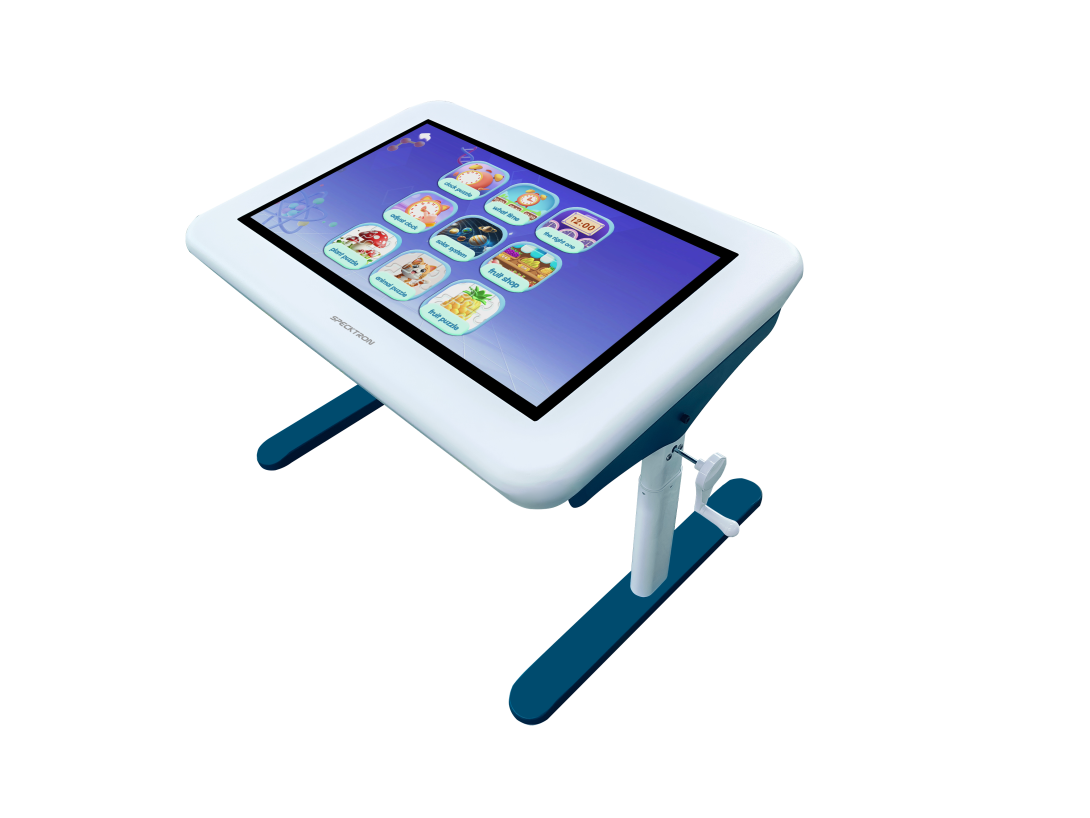
Children learn differently when they can touch, explore, experiment, and participate. While traditional desks and whiteboards continue to have an important role in education, digital technology is creating new ways for students to interact with lessons.
One such technology is the interactive smart table. Instead of asking students to sit in front of an individual screen, an interactive table creates a shared space where several children can learn and participate together.
This approach can make digital learning more hands-on while encouraging communication, teamwork, and problem-solving.
What Is an Interactive Smart Table?
An interactive smart table is a large touchscreen designed in a table-like format. Students can interact directly with digital content using their fingers rather than relying only on a keyboard or mouse.
Depending on the model and software, students can use the table for educational activities, games, presentations, creative exercises, and collaborative projects.
The Specktron Interactive Smart Table, for example, supports multi-touch interaction and is designed to encourage group-based learning. Its adjustable design can also make it suitable for different age groups and classroom environments.
Why Is Collaborative Learning Important?
Learning is not only about remembering information. Children also need opportunities to communicate, share ideas, solve problems, and work with others.
A shared interactive screen can encourage students to participate in the same activity. Instead of one student using a device while others watch, multiple students can interact with content together.
For example, a group of students could work together to solve a puzzle, explore a science activity, identify shapes, or complete a mathematics exercise.
This creates opportunities for students to learn from both the teacher and their classmates.
Making STEAM Learning More Interactive
STEAM education combines Science, Technology, Engineering, Arts, and Mathematics. These subjects often benefit from activities that allow students to explore concepts rather than simply read about them.
An interactive smart table can support this type of learning through visual activities and educational applications.
For example:
- Students can explore scientific concepts through interactive activities.
- Mathematics problems can become visual and hands-on.
- Engineering concepts can be introduced through puzzles and problem-solving tasks.
- Art activities can allow children to create directly on the screen.
- Technology concepts can be introduced through interactive educational content.
- The objective is not to replace teachers or traditional learning methods. Instead, technology can provide another way to explain and explore concepts.
Multiple Students Can Participate
One of the useful features of an interactive table is multi-touch functionality.
When several touch points are supported, more than one student can interact with the screen at the same time. This can make group activities more practical.
For teachers, this creates the possibility of designing activities where students have different roles. One student might solve a problem, another could arrange information, while another checks the result.
Such activities can encourage teamwork rather than individual screen use.
A More Flexible Learning Environment
Children of different ages and sizes may use the same learning environment. Adjustable-height designs can help make interactive tables more comfortable for different users.
This flexibility can be useful in schools, activity centers, early-learning environments, libraries, and other educational spaces.
The physical design is also important. Since the table may be used by young children, safety, durability, and ease of use should be considered when selecting an interactive learning solution.
Interactive Learning Beyond Schools
Interactive smart tables are not limited to traditional classrooms.
They can potentially be used in:
Early Learning Centers
Young children can explore numbers, letters, shapes, colors, and basic concepts through interactive activities.
Libraries
Libraries can use interactive technology to create educational corners where children can explore digital content while learning independently or with others.
Museums and Learning Centers
Interactive tables can make exhibitions more engaging by allowing visitors to explore information, maps, images, and educational activities.
Training and Activity Spaces
Learning centers can use interactive tables for group exercises, demonstrations, and collaborative activities.
Does Technology Replace Traditional Learning?
A common question surrounding educational technology is whether digital tools could replace traditional teaching methods.
In practice, technology works best when it supports a well-designed learning strategy.
Teachers remain important for explaining concepts, guiding students, answering questions, and understanding individual learning needs. An interactive table simply provides another tool that teachers can use when it fits the lesson.
A balanced classroom can combine books, physical activities, discussions, writing, creative work, and digital learning.
What Should Schools Consider Before Choosing an Interactive Table?
Schools should look beyond the touchscreen itself. Several factors can influence whether a solution is suitable for a particular learning environment.
These include:
- Screen size
- Multi-touch capability
- Available educational content
- Software compatibility
- Adjustable height
- Durability
- Child safety
- Ease of maintenance
- Classroom size
- Number of students using it
- Available technical support
The right solution should fit the teaching method and the needs of the students rather than simply adding technology for the sake of technology.
The Future of Interactive Learning
Education technology continues to evolve. Interactive displays, smart boards, learning platforms, AI-powered educational tools, and collaborative technologies are creating more opportunities for students to participate actively in lessons.
Interactive smart tables are part of this wider movement toward experiential and collaborative learning. Their biggest value may not simply be the touchscreen itself, but the way they can encourage students to learn together, experiment, communicate, and solve problems.
Conclusion
The classroom of the future does not necessarily need to look completely different from today's classroom. Instead, familiar teaching methods can be supported by technologies that give students more ways to participate.
An interactive smart table can create a shared digital learning space where children can explore educational content and work together. From STEAM activities and problem-solving to creative exercises and group learning, it can add another dimension to classroom experiences.
When thoughtfully integrated with teaching, interactive technology can help make learning more engaging, collaborative, and hands-on—while keeping the teacher and students at the center of the experience.